When working on UX Prototyping in Figma and then porting them to Flutter, I found myself fiddling with the Row/Column/Wrap widgets and it never felt exactly right, or it would take a lot of code to match the design. No more!~
After many hours, I caved and designed the AutoLayoutFrame widget, and after adding a battery of tests and touching up the docs, I decided to release it for the benefit of the community 

It has everything you need:
- it’s nestable!

- has Figma’s
hugChildren/fillContainer/fixedsizing - easily switch between Row/Column/Wrap
- supports predefined overflow behaviors like
none/scroll/visible/clip - padding, gap, alignment, and more!
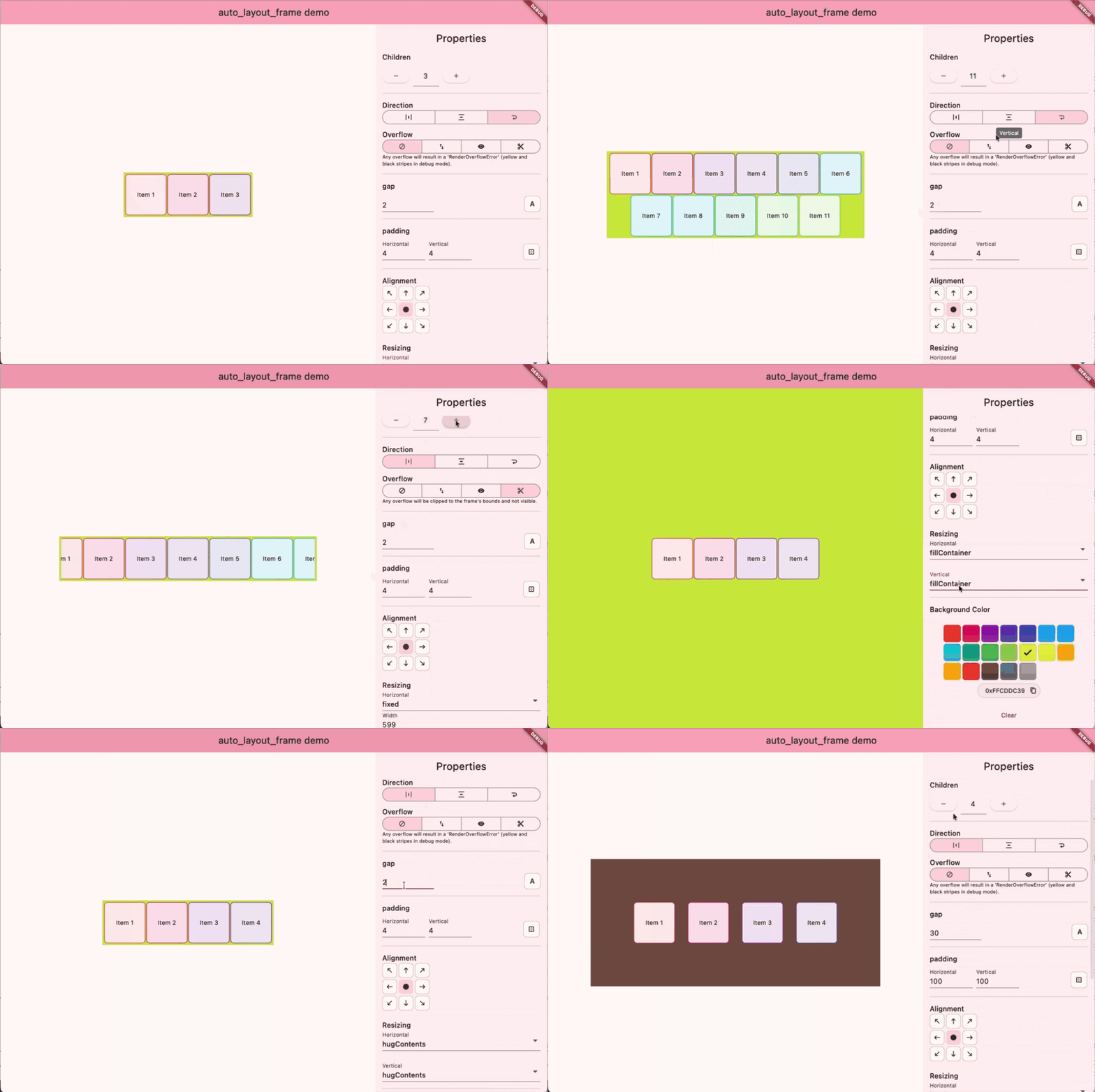
editor seen above available in example/editor in the repository
Other bonuses:
- No dependencies
- Doesn’t use Material/Cupertino, just the good ol’
widgets.dart - Keeps things simple~
Let me know if you have any questions, feedback or bugs!~
pub.dev package: auto_layout_frame | Flutter package
GitHub repo: GitHub - kerberjg/auto_layout_frame.dart: 🧩🩵 Figma's Auto Layout Frame as a Flutter widget
BlueSky announcement: @kerberjg.bsky.social on Bluesky
Big thanks to my GitHub Sponsors! 


- Mark Videon @mark