Hello,
I am going half mad trying to resolve how to support ‘background notifications’ on my Flutter web app, and I’m hoping somebody who might have solved this can help me.
The backdrop is that i have a Flutter app that has Android and web deployments. I want to implement FCM message/notifications for both platforms. For the web app, foreground notifications work fine - no problem. The issue lies when the web app is active tab in the Chrome browwer - nothing is displayed.
My test scenario:
- Open the Flutter web app in debug mode from IntelliJ in Chrome (on Mac Mini)
- Execute a feature that will generate a notification within a couple of minutes
- Open a new tab on the Chrome browser and make. it the active tab.
- Wait for the browser to show a notifiation ( nothing happens)
Any suggestions?
Here are the key files:
firebase-messaging-sw.js
importScripts('https://www.gstatic.com/firebasejs/10.7.0/firebase-app-compat.js');
importScripts('https://www.gstatic.com/firebasejs/10.7.0/firebase-messaging-compat.js');

importScripts('flutter_service_worker.js');

firebase.initializeApp({
    apiKey: 'xxxxx',
    appId: 'xxxxxx,
    messagingSenderId: 'xxxx',
    projectId: 'xxxxx',
    authDomain: 'xxxxxx',
    storageBucket: 'xxxxxx',
    measurementId: 'xxxxxx',
});

const messaging = firebase.messaging();

self.addEventListener('install', (event) => {
    event.waitUntil(self.skipWaiting());
});

self.addEventListener('activate', (event) => {
    event.waitUntil(
        clients.claim().then(() => {
            console.log('Service Worker now controlling all clients at root scope.');
        })
    );
});
self.addEventListener('fetch', (event) => {
    // We don't need to intercept anything, but the listener must exist
});

messaging.onBackgroundMessage((payload) => {

    console.log('[sw.js] Received background message: ', payload);

    // Extract data from the payload you provided
    const notificationTitle = payload.notification ? payload.notification.title : 'Good Day';
    const notificationOptions = {
        body: payload.notification ? payload.notification.body : '',
        icon: '/icons/Icon-192.png', // Make sure this path exists in your web folder
        badge: '/icons/Icon-192.png',
        data: payload.data, // This allows you to handle the click later
        tag: 'task-reminder', // Groups similar notifications
        renotify: true
    };

    console.log('[sw.js] Pre message call: ', notificationOptions);

    // CRITICAL: You must return the promise from showNotification
    // This tells the browser to keep the service worker alive long enough to show the UI
    return self.registration.showNotification(notificationTitle, notificationOptions);
});


self.addEventListener('notificationclick', (event) => {
    console.log('[SW] Notification clicked:', event.notification);

    event.notification.close();

    const route     = event.notification.data?.route || '/';
    const targetUrl = self.location.origin + '/#' + route;

    event.waitUntil(
        clients
            .matchAll({ type: 'window', includeUncontrolled: true })
            .then((clientList) => {
                // If a window for this origin is already open, focus and navigate it
                for (const client of clientList) {
                    if (client.url.startsWith(self.location.origin) && 'focus' in client) {
                        client.focus();
                        client.navigate(targetUrl);
                        return;
                    }
                }
                // Otherwise open a new window
                return clients.openWindow(targetUrl);
            })
    );
});
index.html
<!DOCTYPE html>
<html>
<head>
    <!--
      If you are serving your web app in a path other than the root, change the
      href value below to reflect the base path you are serving from.

      The path provided below has to start and end with a slash "/" in order for
      it to work correctly.

      For more details:
      * https://developer.mozilla.org/en-US/docs/Web/HTML/Element/base

      This is a placeholder for base href that will be replaced by the value of
      the `--base-href` argument provided to `flutter build`.
    -->
    <base href="$FLUTTER_BASE_HREF">

    <meta charset="UTF-8">
    <meta content="IE=Edge" http-equiv="X-UA-Compatible">
    <meta name="description" content="Good Day - personal planning system">

    <!-- iOS meta tags & icons -->
    <meta name="mobile-web-app-capable" content="yes">
    <meta name="apple-mobile-web-app-status-bar-style" content="black">
    <meta name="apple-mobile-web-app-title" content="good_day">
    <meta name="google-signin-client_id"
          content="680598297474-s0fqqlp97av858hi5693i73giql3fin7.apps.googleusercontent.com">
    <link rel="apple-touch-icon" href="icons/Icon-192.png">

    <!-- Favicon -->
    <link rel="icon" type="image/png" href="favicon.png"/>
    <title>good_day</title>
    <link rel="manifest" href="manifest.json">
    <script>
        const serviceWorkerVersion = null;
    </script>
</head>
<body>

<script>
    window.addEventListener('load', async function(ev) {
        // 1. Manually register the SW at the root scope FIRST
        if ('serviceWorker' in navigator) {
            try {
                const registration = await navigator.serviceWorker.register('/firebase-messaging-sw.js', {
                    scope: '/'
                });
                console.log('Service Worker registered at root scope:', registration.scope);
            } catch (error) {
                console.error('Service Worker registration failed:', error);
            }
        }

        // 2. Now let Flutter load
        _flutter.loader.load({
            onEntrypointLoaded: async function(engineInitializer) {
                const appRunner = await engineInitializer.initializeEngine({
                    serviceWorkerVersion: serviceWorkerVersion,
                });
                await appRunner.runApp();
            }
        });
    });
</script>

<script src="flutter_bootstrap.js" async>
</script>

</body>
</html>
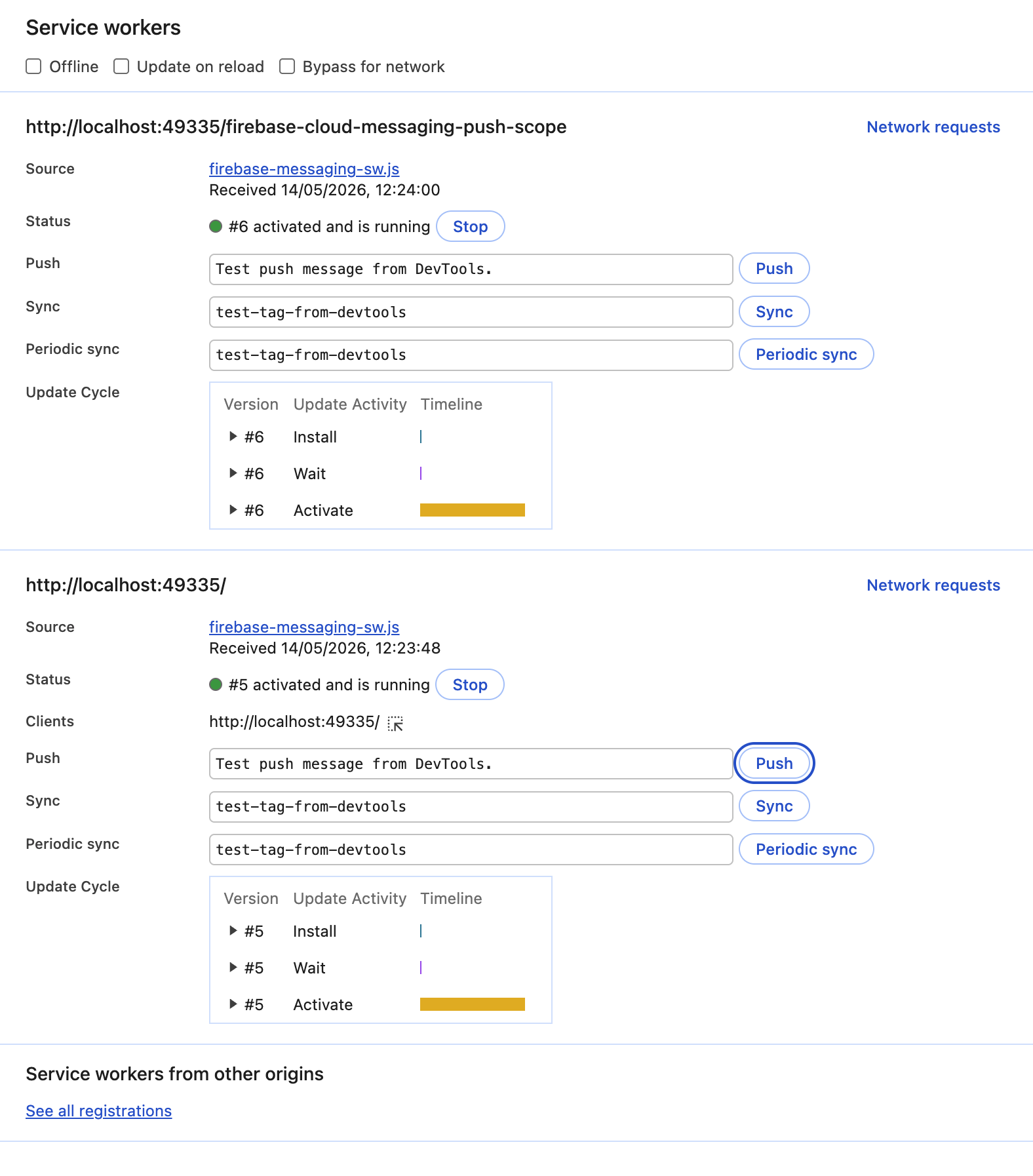
The special js code in the index.html file is taken from various suggestions from Ai engines. it’s about getting around the problem that an out of the box solution will activate two service workers, one by Firebase, and one from the app, and the app SW never receives a notiidation, as shown below
TIA