My usecase is a grid for a timetable where the vertical coordinates are 15 min timeslots and the horizontal axis are events (in my case lessons) happening simultaneously. I can imagine this being a use case for others, too. Unfortunately I don’t have the time now to look at it myself, so just an idea for now. Thank you for sharing with the community!
oki. what you need is a time(table) widget. This is a bit different, but that might be an interesting challenge once I’ll have reached v1 (I hope soon).
Atm, target is dashboard/grid engine for stuff like analytics, iot (like grafana) etc. But sure, it can also be used for building UI with lazy loading (and it’s also composable with others slivers which is handy).
Actually, my goal is to fill the gap between Flutter and JS grid engines.. the direct “JS contender” is react-grid-layout (I’ve been heavily inspired by this package). And I added some fancy features and opti.
Remaining tasks on my todo:
- Allow to create your own custom compaction and positioning algo
- Sections/visual headers to segment the dashboard, with sticky option
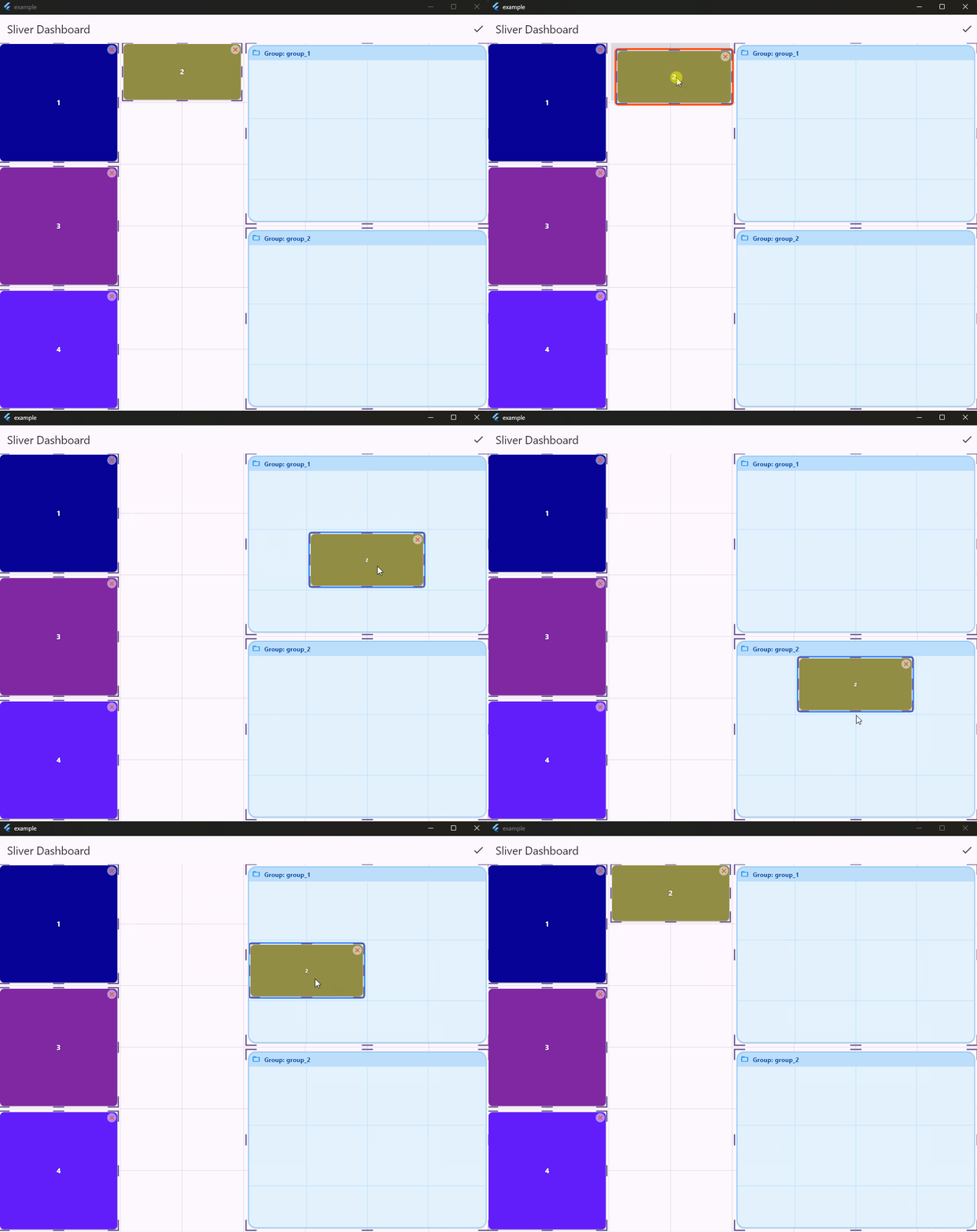
- Allow items to be dropped into or dragged out of groups.
1 Like
For those following my iterations, in next coming version (0.9) :
- new feat: add your custom compaction algo, by implementing CompactorDelegate to define custom rules (e.g., specific gravity, fixed zones).
- huge performance boost on compaction algo. noticeable when there are a lot of items in dashboard
Compaction algo comparison v.0.8 (old) vs 0.9 (new), on desktop:
┌──────────────────────────────────────────────────────────────────────────┐
│                          BENCHMARK RESULTS                               │
├──────────────────────────────────────────────────────┬───────────────────┤
│ Test                                                 │ Time              │
├──────────────────────────────────────────────────────┼───────────────────┤
│ COMPACTION                                           │                   │
├──────────────────────────────────────────────────────┼───────────────────┤
│   Vertical Old (100 items)                           │           1.22 ms │
│   Vertical New (100 items)                           │             17 µs │
│   Horizontal Old (100 items)                         │            355 µs │
│   Horizontal New (100 items)                         │             17 µs │
│   Vertical Old (500 items)                           │          99.90 ms │
│   Vertical New (500 items)                           │             99 µs │
│   Horizontal Old (500 items)                         │          10.30 ms │
│   Horizontal New (500 items)                         │            101 µs │
│   Vertical Old (1000 items)                          │         898.88 ms │
│   Vertical New (1000 items)                          │            222 µs │
│   Horizontal Old (1000 items)                        │          37.99 ms │
│   Horizontal New (1000 items)                        │            217 µs │
│ MOVE                                                 │                   │
├──────────────────────────────────────────────────────┼───────────────────┤
│   Move Element (100 items)                           │             72 µs │
│   Move Element (500 items)                           │           1.40 ms │
│ SORT                                                 │                   │
├──────────────────────────────────────────────────────┼───────────────────┤
│   Sort Layout (100 items)                            │              6 µs │
│   Sort Layout (500 items)                            │             43 µs │
│   Sort Layout (1000 items)                           │             99 µs │
│ OPTIMIZE                                             │                   │
├──────────────────────────────────────────────────────┼───────────────────┤
│   Defrag (100 items)                                 │           4.76 ms │
│   Defrag (500 items)                                 │         855.42 ms │
└──────────────────────────────────────────────────────┴───────────────────┘
Optimize Defrag is not called by dashboard, this is an api that can ponctually be used when you want to “defragment” your dashboard.
Would be interesting to compare to the JS contender I mentioned previously. Although they use mutable state if I’m not wrong, and my package uses immutable and copyWith, I wouldn’t be suprised if we get better results thx to AOT (maybe same for web wasm..). When I’ll have more time, I’ll compare both.
Final stretch before the 1.0 …
2 Likes
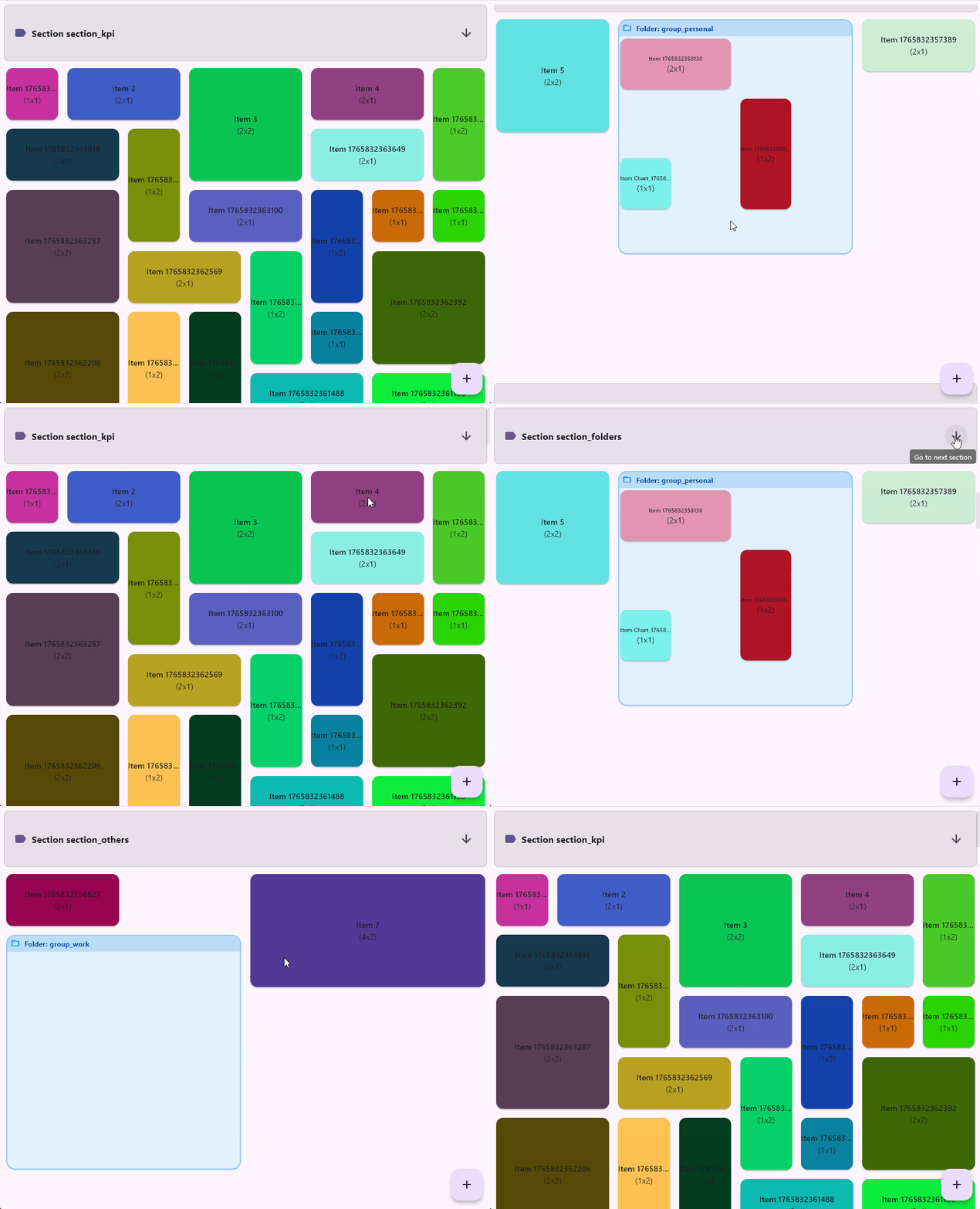
POC: nested dashboards/groups
- Sections
- Folders/Groups (nested dashboard)
- scrollToItem by its logical id
Hi there.
Since last time, sliver_dashboard has grown a lot, and the upcoming 2.0 feels like the right moment to check back in. It’s also getting more popularity on pub dev which I think is pretty cool and encouraging 
If there’s one sentence to remember, it’s this: sliver_dashboard is not a classic grid widget. It’s a deterministic, testable layout engine that happens to render through Flutter slivers.
You can use it to build interactive, draggable/resizable dashboard grid, on Flutter’s sliver protocol, so it virtualizes. Only visible tiles are built, and drag/resize stay allocation-free in the layout hot path. If you’ve used gridstack.js or react-grid-layout on the web, this is it; this is a native Flutter take on the same idea, with a single codebase, crossplatform.
If you read me.. Thank you Dart/Flutter Team 
Smooth on Flutter Web/JS even when when I stress tested it with 1000 items, scroll, drag/drop feel smooth. You can already check this using v1.x demo link on pub dev
V2 is not released yet on pub dev, I need a few more days of testing, just to be sure. But it’s already available on github if you’re curious or need it.
This 1.x demo is available on pub dev:
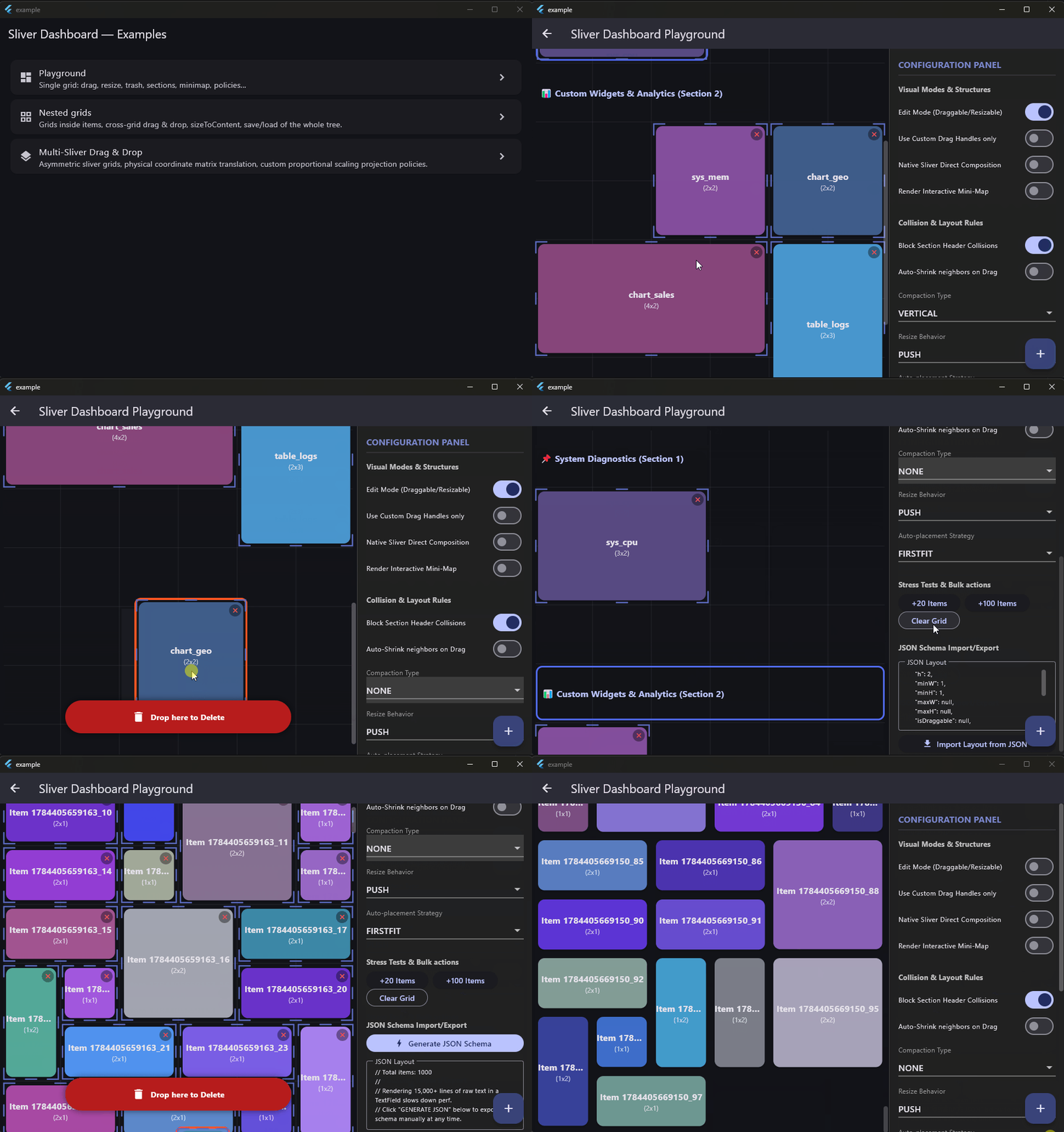
And, what’s new in upcoming 2.0:
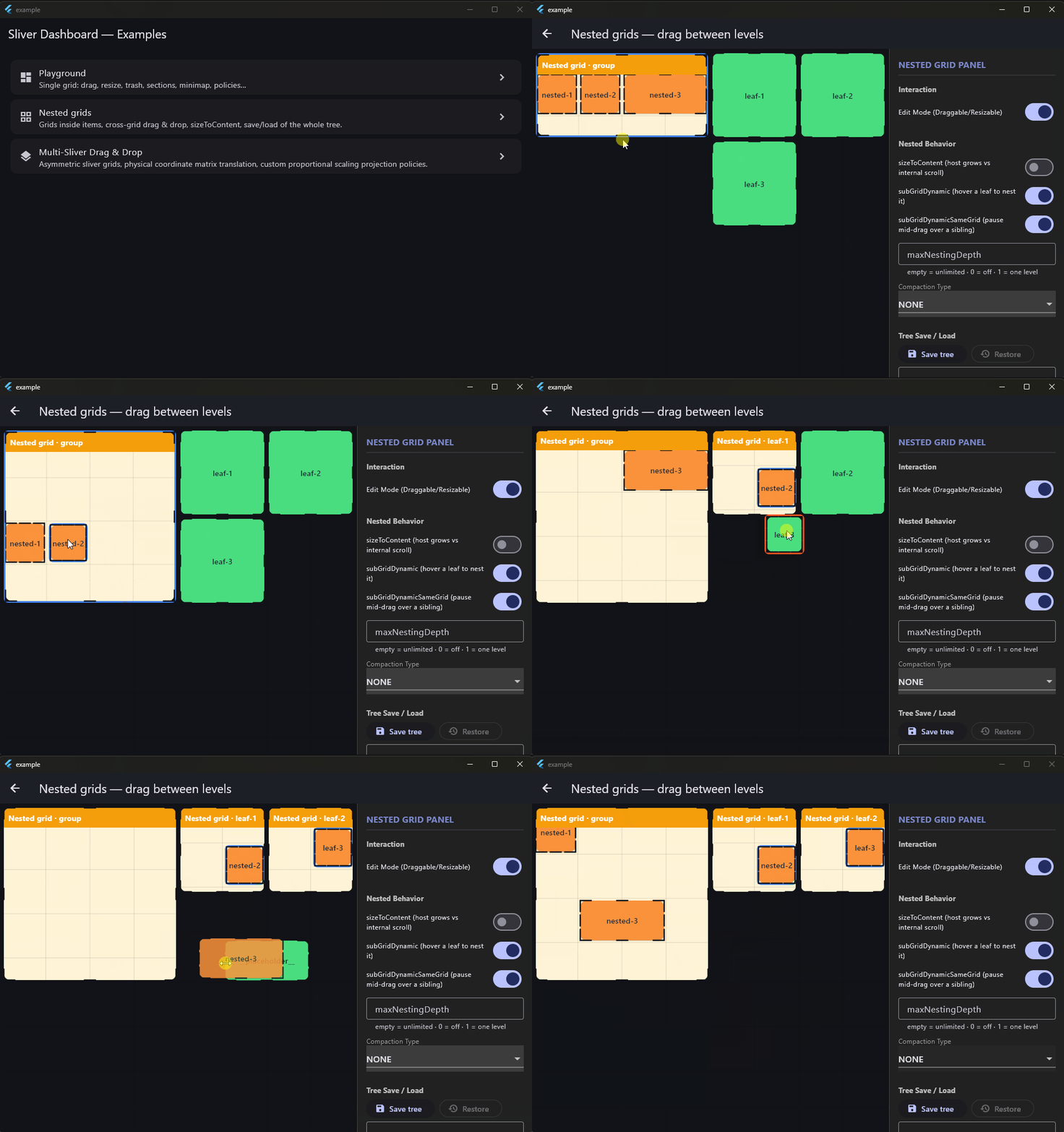
- Nested grids: embed a full dashboard inside any tile
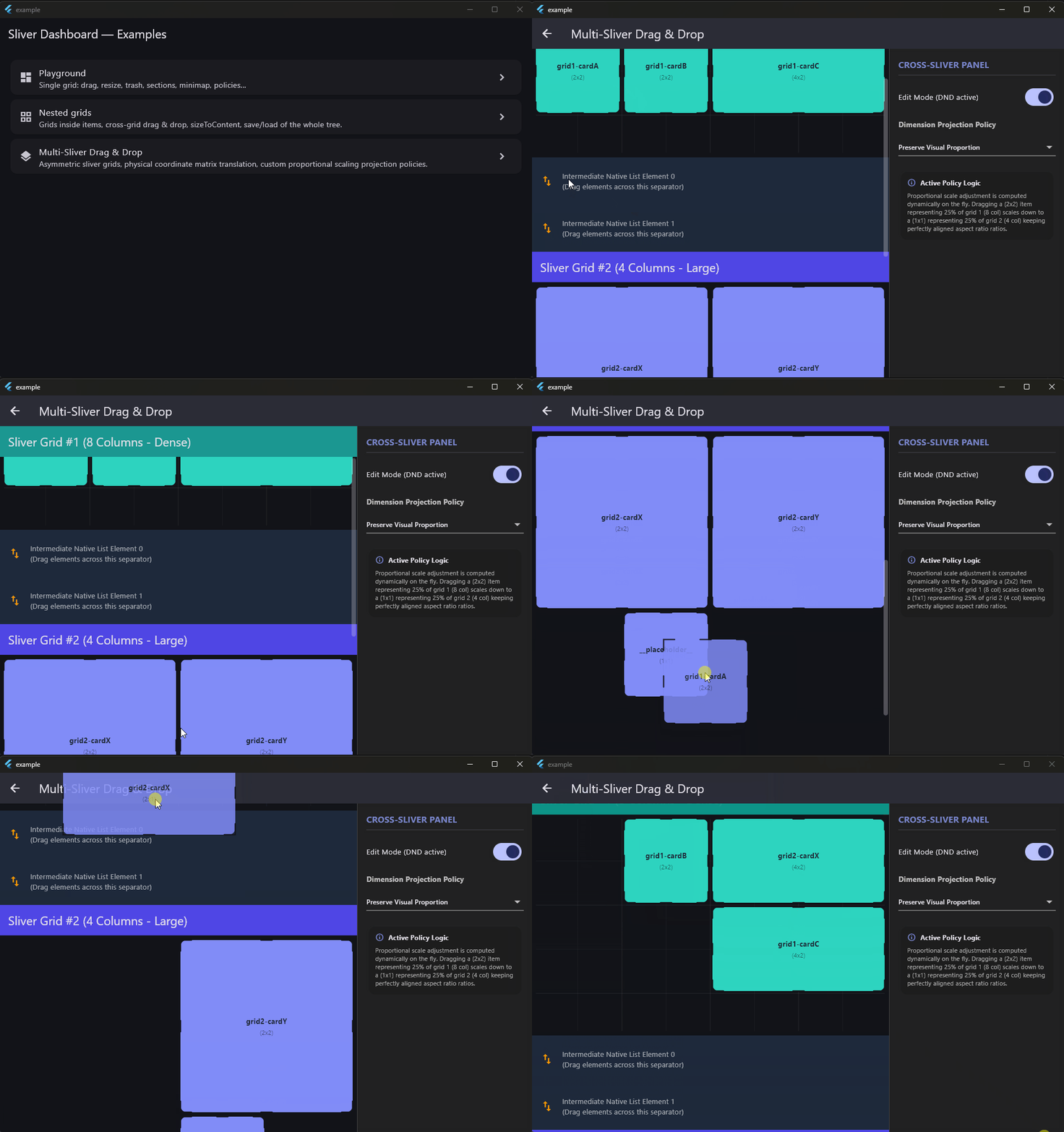
- Cross-grid drag & drop: move tiles between nested, sibling, or independent grids, with dimension projection between different column counts
- Paint-phase reflow animations (opt-in): pushed tiles slide on the GPU, no widget rebuilds
- A richer minimap (markers, multiple viewports)
- etc.
Hello.
As promised, sliver_dashboard v2 is now available on pub.dev! 
Built for “production-grade” stability:
- 98% code coverage with 450 unit & widget tests to prevent layout regressions (8K lines of production code, 10K for tests).
- Strict type safety and linting using very_good_analysis.
Check out the updated documentation:
[Link to pub.dev]
I might be biased, but I think this is a unique solution in the Flutter ecosystem; a true sliver-based alternative to GridStack and react-grid-layout.
I would love to hear your feedback, thoughts, or see what you build with it.
Enjoy!
I’m continuing to stress-test sliver_dashboard. This is purely out of curiosity, to see how far it’s possible to push the layout engine to its limits.. because to be honest, I’ve never seen a dashboard with 4 000 or 10 000 items 
──────────────────────────────────────────────────────────────────────────────┐
│ BENCHMARK RESULTS │
├──────────────────────────────────────────────────┬─────────────┬─────────────┤
│ Test │ Median │ Best │
├──────────────────────────────────────────────────┼─────────────┼─────────────┤
│ COMPACTION (DEEP INPUT) │ │ │
├──────────────────────────────────────────────────┼─────────────┼─────────────┤
│ Vertical Standard (100 items) │ 44 µs │ 42 µs │
│ Vertical Fast/Tide (100 items) │ 35 µs │ 34 µs │
│ Horizontal Standard (100 items) │ 89 µs │ 86 µs │
│ Horizontal Fast/Tide (100 items) │ 35 µs │ 34 µs │
│ Vertical Standard (500 items) │ 299 µs │ 293 µs │
│ Vertical Fast/Tide (500 items) │ 250 µs │ 238 µs │
│ Horizontal Standard (500 items) │ 487 µs │ 476 µs │
│ Horizontal Fast/Tide (500 items) │ 266 µs │ 262 µs │
│ Vertical Standard (1000 items) │ 586 µs │ 542 µs │
│ Vertical Fast/Tide (1000 items) │ 525 µs │ 509 µs │
│ Horizontal Standard (1000 items) │ 992 µs │ 900 µs │
│ Horizontal Fast/Tide (1000 items) │ 568 µs │ 539 µs │
│ Vertical Standard (2000 items) │ 1.35 ms │ 1.29 ms │
│ Vertical Fast/Tide (2000 items) │ 1.15 ms │ 1.12 ms │
│ Horizontal Standard (2000 items) │ 2.14 ms │ 2.04 ms │
│ Horizontal Fast/Tide (2000 items) │ 1.27 ms │ 1.21 ms │
│ Vertical Standard (4000 items) │ 2.88 ms │ 2.51 ms │
│ Vertical Fast/Tide (4000 items) │ 2.62 ms │ 2.54 ms │
│ Horizontal Standard (4000 items) │ 4.69 ms │ 4.54 ms │
│ Horizontal Fast/Tide (4000 items) │ 2.70 ms │ 2.53 ms │
│ Vertical Standard (10000 items) │ 7.49 ms │ 7.30 ms │
│ Vertical Fast/Tide (10000 items) │ 7.66 ms │ 7.44 ms │
│ Horizontal Standard (10000 items) │ 20.31 ms │ 18.85 ms │
│ Horizontal Fast/Tide (10000 items) │ 7.58 ms │ 7.07 ms │
├──────────────────────────────────────────────────┼─────────────┼─────────────┤
│ COMPACTION (ALREADY COMPACT) │ │ │
├──────────────────────────────────────────────────┼─────────────┼─────────────┤
│ Vertical Standard (100 items) │ 35 µs │ 34 µs │
│ Vertical Standard (500 items) │ 203 µs │ 200 µs │
│ Vertical Standard (1000 items) │ 445 µs │ 441 µs │
│ Vertical Standard (2000 items) │ 1.06 ms │ 961 µs │
│ Vertical Standard (4000 items) │ 2.15 ms │ 2.13 ms │
│ Vertical Standard (10000 items) │ 6.69 ms │ 6.14 ms │
├──────────────────────────────────────────────────┼─────────────┼─────────────┤
│ RESIZE (TOP OF GRID) │ │ │
├──────────────────────────────────────────────────┼─────────────┼─────────────┤
│ resizeItem push at top (500 items) │ 1.10 ms │ 1.07 ms │
│ resizeItem push at top (1000 items) │ 816 µs │ 766 µs │
│ resizeItem push at top (2000 items) │ 139 µs │ 135 µs │
│ resizeItem push at top (4000 items) │ 292 µs │ 288 µs │
│ resizeItem push at top (10000 items) │ 27.66 ms │ 25.86 ms │
├──────────────────────────────────────────────────┼─────────────┼─────────────┤
│ MOVE │ │ │
├──────────────────────────────────────────────────┼─────────────┼─────────────┤
│ Move Element (100 items) │ 61 µs │ 57 µs │
│ Move Element (500 items) │ 389 µs │ 348 µs │
│ Move Element (1000 items) │ 705 µs │ 699 µs │
│ Move Element (2000 items) │ 1.48 ms │ 1.46 ms │
│ Move Element (4000 items) │ 3.18 ms │ 2.91 ms │
│ Move Element (10000 items) │ 8.77 ms │ 8.22 ms │
├──────────────────────────────────────────────────┼─────────────┼─────────────┤
│ SORT │ │ │
├──────────────────────────────────────────────────┼─────────────┼─────────────┤
│ Sort Layout (100 items) │ 14 µs │ 14 µs │
│ Sort Layout (500 items) │ 93 µs │ 91 µs │
│ Sort Layout (1000 items) │ 213 µs │ 204 µs │
│ Sort Layout (2000 items) │ 512 µs │ 472 µs │
│ Sort Layout (4000 items) │ 1.03 ms │ 1.01 ms │
│ Sort Layout (10000 items) │ 4.02 ms │ 3.83 ms │
├──────────────────────────────────────────────────┼─────────────┼─────────────┤
│ OPTIMIZE │ │ │
├──────────────────────────────────────────────────┼─────────────┼─────────────┤
│ Defrag (100 items) │ 236 µs │ 234 µs │
│ Defrag (500 items) │ 1.77 ms │ 1.62 ms │
│ Defrag (1000 items) │ 3.63 ms │ 3.56 ms │
│ Defrag (2000 items) │ 8.58 ms │ 7.88 ms │
│ Defrag (4000 items) │ 21.87 ms │ 21.05 ms │
│ Defrag (10000 items) │ 92.49 ms │ 79.24 ms │
└──────────────────────────────────────────────────┴─────────────┴─────────────┘
Note: operations like Defrag are separate from realtime interaction loops. While draggingn, resizing and scrolling run many times/sec on the layout “hot path”, which is why their sub 10ms perf is so critical, defragmentation on the other side is an on-demand operation usually triggered by a user clicking a button and has no impact on UI fluidity.
I benchmark sliver_dashboard engine in AOT mode, on an “old” Ryzen 2600 machine, Windows 11.
Release 2.2.0.
Brings a few optimizations, and 100% code coverage.
I think it’s feature complete, at least for me, but if you need a feature or any help, don’t hesitate to ask me.
I use it in production projects, so I’ll continue maintenance.
Sadly I tried to showcase it on reddit flutterdev, my handwritten posts got filtered twice.. no idea why, maybe because I’m a new user, no way to contact modos, so, never mind, I’m giving up to showcase it there.
Have a good day!
I just released sliver_dashboard 2.4.0.
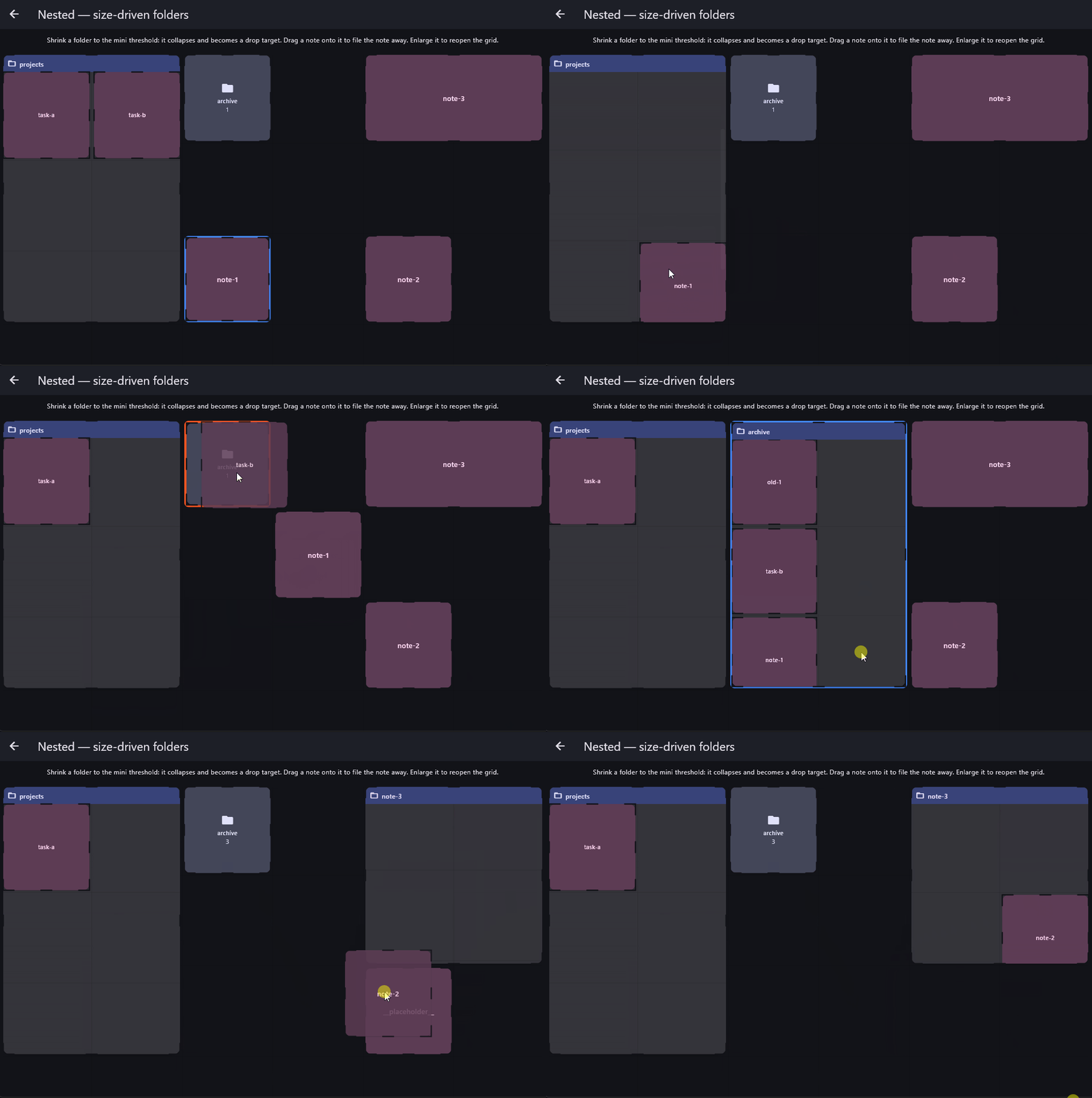
It allows dropping into collapsible folders/hosts, and also provides a new projection policy preservePixelSize“.
I modified the nested example to show how you can now build size-driven collapsible folders by using the itemBreakpointBuilder (instead of the regular itemBuilder), which rebuilds only when its item breakpoint resolver callback is called:
shrink a card to collapse it into an interactive drop-target icon (onItemDroppedOnHost) to file items away, or expand it to reopen the full nested grid.
And you can pair it in your projects, with the new preservePixelSize projection policy, dragged tiles will automatically adapt across different grid densities while preserving their exact physical screen size.
Here’s how sliver_dashboard compares to two well-known Web grid libraries.
| Feature | sliver_dashboard | GridStack | React Grid Layout |
|---|---|---|---|
| Ecosystem | Dart/Flutter | JS/TypeScript | JS/TypeScript |
| Platforms |  Android, iOS, Windows, macOS, Linux, Web (JS & Wasm) Android, iOS, Windows, macOS, Linux, Web (JS & Wasm) |
 Web Web |
Web |
| Vertical dashboard | |
|
|
| Horizontal dashboard | |
 |
 Horizontal compaction only Horizontal compaction only |
| Segmented grids / Section barriers | |
|
|
| Native scroll integration | Slivers |
HTML scrolling | HTML scrolling |
| Viewport virtualization | Native |
(lazy loading only) |
|
| Drag & Drop | |
|
|
| Custom drag handles | |
|
|
| Resize | |
|
|
| Responsive layouts | |
|
|
| Per-item breakpoints | |
|
|
| Nested dashboards | |
|
Custom implementation |
| Collapsible nested dashboards | |
|
|
| Drag between dashboards | |
|
Custom implementation |
| Cross-sliver / Multi-sliver drag | |
|
|
| External drag sources | |
|
|
| Built-in trash / delete target | |
Option ‘removable’ |
|
| Built-in guidance / drop hints | |
|
|
| Push collision | |
|
|
| Push-or-shrink collision | |
|
|
| Auto-shrink neighbors on drag | |
|
|
| Reflow animations | |
|
CSS-dependent |
| Layout persistence | |
|
|
| Layout import / export | |
|
|
| Extensible layout algorithms | |
|
|
| Extensible compaction algorithms | |
|
|
| Multi-selection | |
|
|
| Mini-map | |
|
|
| Keyboard accessibility | |
Limited |
Limited |
| Screen reader announcement | |
|
|
| Large-scale dashboards (1000+ items) | |
️ Not documented | ️ Not documented |
But why does it matter?
“Show me your architecture, not your features.”
If you’re curious about how and why sliver_dashboard was designed this way, here are a few links:
Note: I used AI assistants during development (Gemini, Claude), but with a strict discipline to ensure long-term maintainability and robustness: no coding agents (no auto-commit, no “let it run free”). I wanted for this project to stay in full control and truly know my codebase; not delegate ownership to an agent.
Only chat-based assistance, with careful review, all decisions human-driven.
I learnt so many things during this process, about custom slivers etc, I don’t regret it even if it has been more work than using a coding agent (using only chat also saved some credits on my AI subscriptions for my others projects. less requests, tools calls..).
Feedback, questions, and ideas welcome.
sliver_dashboard v2.5 is available.
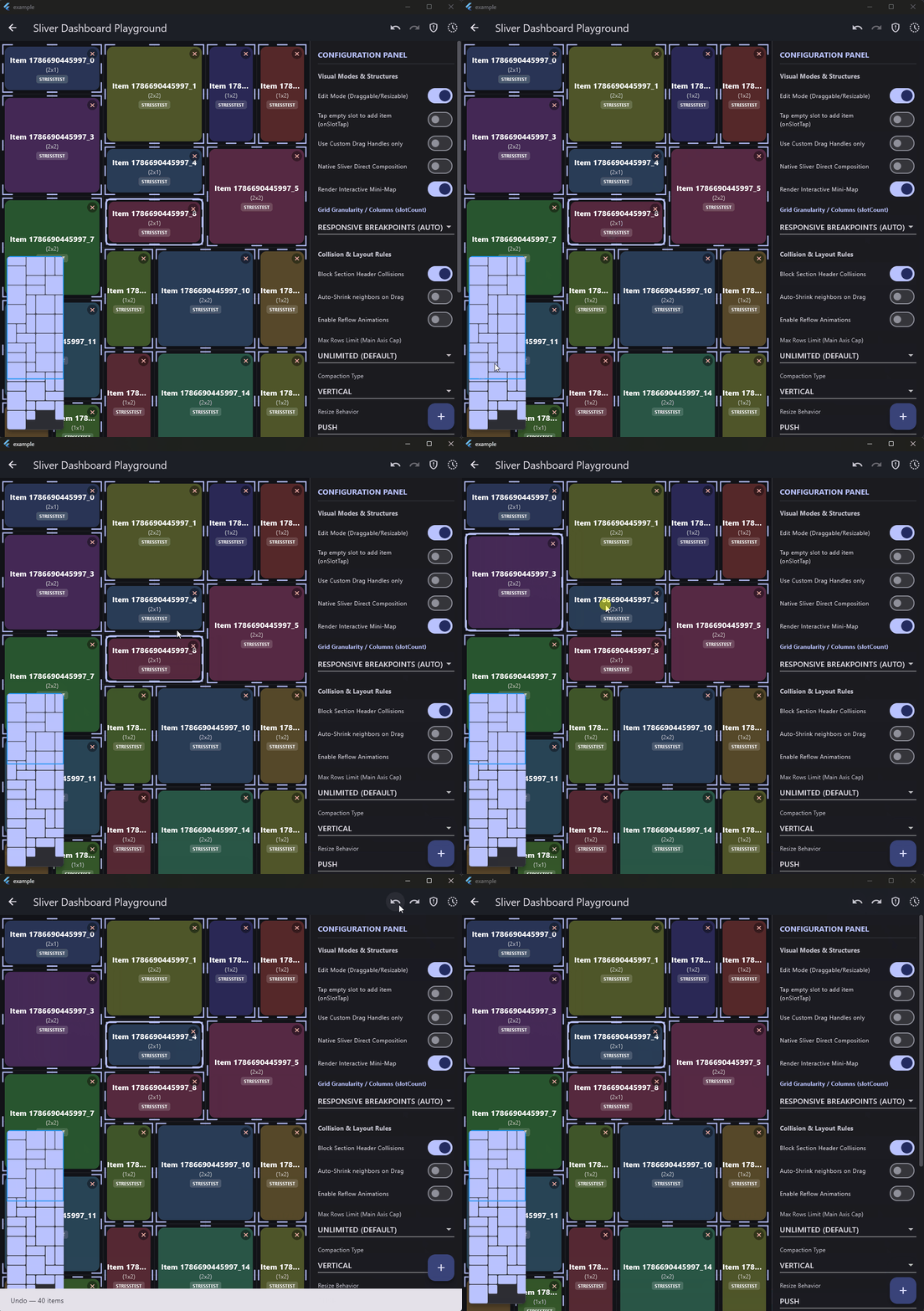
- You can revert or re-apply layout changes with controller.undo() / redo(), reactive canUndo / canRedo, and async veto hooks. It can be disabled with maxHistoryLength: 0. Default is 30.
- Tiles displaced by push cascades can be highlighted during drag operations (“Impact Preview”). This configurable visual feedback is also painted live on the DashboardMinimap.
- Hold Alt or Option (configurable key) when dragging a tile to pull out a copy while leaving the original in place. Driven by your application’s onCloneRequested callback to mint new IDs and custom metadata.
Impact preview, and undo/redo: