Hello,
I am learning flutter currently, and something I want to create is this widget :
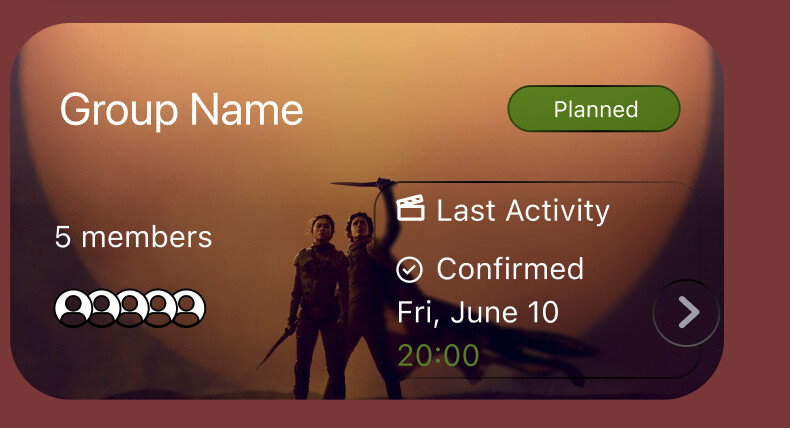
I am not sure how to do it exactly without having to make the four elements of the card (group name, stage tag -planned-, members and the information) Positioned children with hard coded margin values. I do not want to do that because I’ve done some web frontend before and I know there must be someway to use ratios or something similar.
I asked in SO and I was told to try align, I’ve tried to make a container that has a child Decorated box, and then I will try to make children align within that box, I am trying just with one child right now and have :
Widget build(BuildContext context) {
  return Container(
    height: 200,
    width: double.infinity,
    child: DecoratedBox(
      decoration: BoxDecoration(
        border: BoxBorder.all(color: Colors.red, width: 1),
        image: DecorationImage(
          image: AssetImage("assets/photos/budapest-hotel.png"),
        ),
      ),
      child: Align(
        alignment: Alignment.topLeft,
        child: Text("Group name", style: TextStyle(color: Colors.white)),
      ),
    ),
  );
Which results into
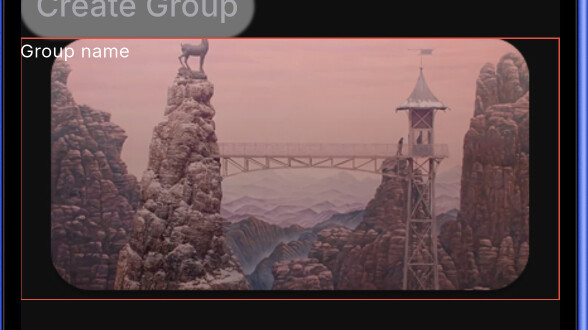
I’ve enabled the border for visual debugging and I notice the BoxDecoration does not limit its size to the image size, and I think solving that would be a step forward because as you see the group name now is not positioned correctly. Can anyone please help me move forward?
Thanks