Since LLMs sometimes leaves unused code behind and dcm is way too expensive (too much), I’ve asked claude to build a code lens VSCode extension for me, showing the number of usages for each member (classes, variables, methods, etc.).
I didn’t even check the code, but it seems to work:
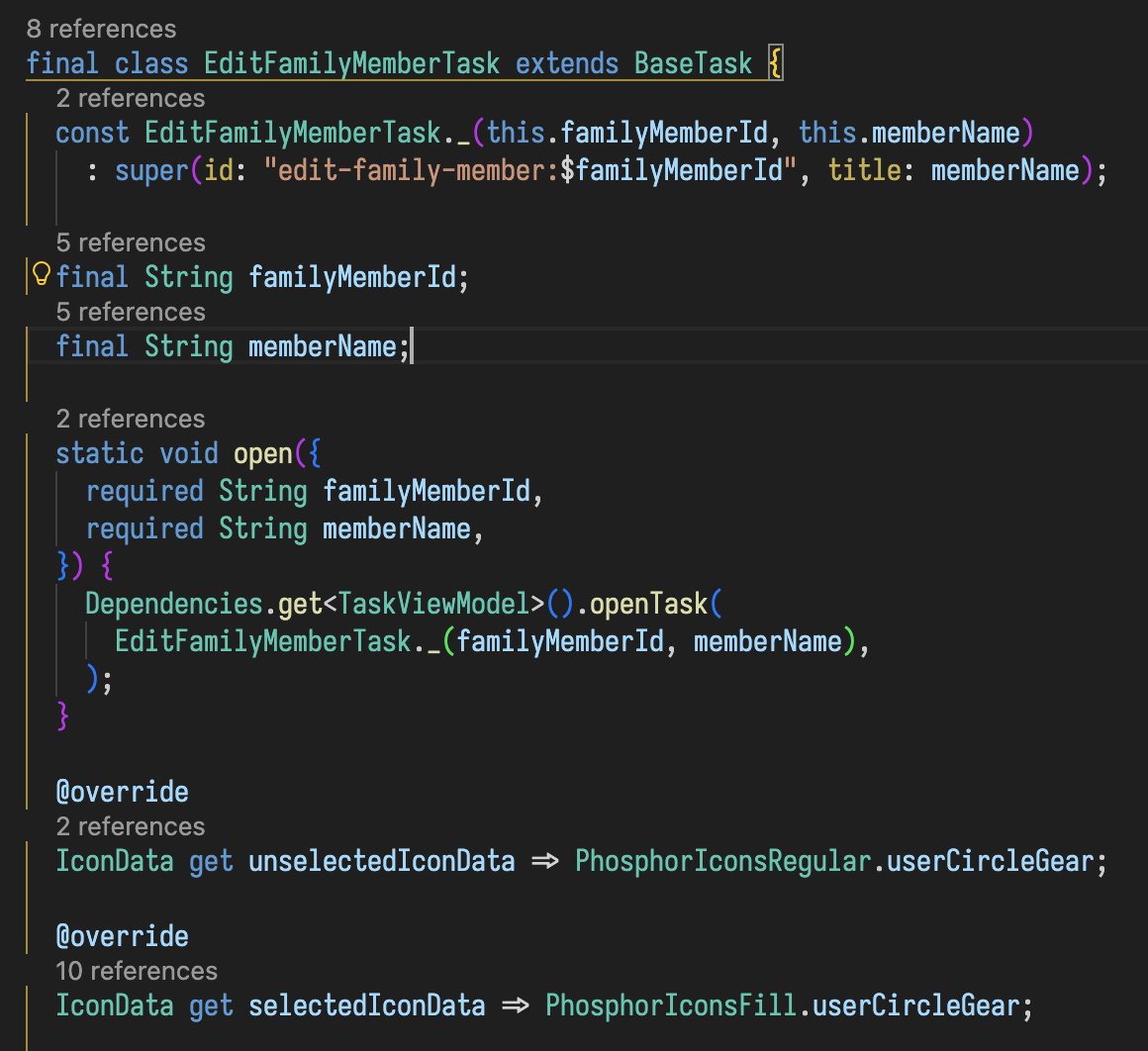
If anyone is interested, here are the files (I don’t plan to publish this)
Dart Reference CodeLens
A Visual Studio Code extension that shows reference counts above classes, methods, constructors, and public variables in Dart files. It uses the Language Server Protocol (LSP) to get accurate reference information from the Dart Analysis Server.
Features
-
Reference Counts: Shows how many times each symbol is referenced across your codebase
-
Zero Reference Warning: Highlights symbols with 0 references with a
 icon to help you find unused code
 -
Click to Navigate: Click on the reference count to see all references in a peek view
-
Configurable: Choose which symbols to show (classes, methods, properties, constructors, enums)
-
Smart Filtering: Automatically excludes private members and generated files
Requirements
-
Visual Studio Code 1.74.0 or higher
-
Dart extension installed and active
-
A Dart/Flutter project with the Dart Analysis Server running
Installation
From VSIX file
-
Download the
.vsixfile from the releases -
In VS Code, go to Extensions (Ctrl+Shift+X)
-
Click the
...menu and select “Install from VSIX…” -
Select the downloaded file
From Source
# Clone the repository

git clone https://github.com/sbrobow/dart-reference-codelens.git

cd dart-reference-codelens

# Install dependencies

npm install

# Compile

npm run compile

# Package

npm run package
Configuration
The extension provides several configuration options:
| Setting | Default | Description |
|---------|---------|-------------|
| dartReferenceCodeLens.enabled | true | Enable/disable reference CodeLens |
| dartReferenceCodeLens.showClasses | true | Show reference counts for classes |
| dartReferenceCodeLens.showMethods | true | Show reference counts for methods/functions |
| dartReferenceCodeLens.showProperties | true | Show reference counts for public properties |
| dartReferenceCodeLens.showConstructors | true | Show reference counts for constructors |
| dartReferenceCodeLens.showEnums | true | Show reference counts for enums |
| dartReferenceCodeLens.highlightUnused | true | Show for symbols with 0 references |
| dartReferenceCodeLens.excludePatterns | ["**/generated/**", "**/*.g.dart", "**/*.freezed.dart"] | Files to exclude |
| dartReferenceCodeLens.minReferencesToShow | 0 | Minimum references to show CodeLens |
Example Configuration
Add to your settings.json:
{

"dartReferenceCodeLens.enabled": true,

"dartReferenceCodeLens.showClasses": true,

"dartReferenceCodeLens.showMethods": true,

"dartReferenceCodeLens.showProperties": false,

"dartReferenceCodeLens.highlightUnused": true,

"dartReferenceCodeLens.excludePatterns": [

"**/generated/**",

"**/*.g.dart",

"**/*.freezed.dart",

"**/test/**"

]

}
Commands
| Command | Description |
|---------|-------------|
| Dart Reference CodeLens: Refresh | Manually refresh all CodeLens |
| Dart Reference CodeLens: Toggle | Toggle the extension on/off |
How It Works
-
When you open a Dart file, the extension requests document symbols from the Dart Analysis Server via the LSP
-
For each public symbol (class, method, property, etc.), it queries the LSP for all references
-
The reference count is displayed as a CodeLens above each symbol
-
Clicking on the CodeLens shows all references in a peek view
The extension uses VSCode’s built-in commands:
-
vscode.executeDocumentSymbolProvider- Get all symbols in the document -
vscode.executeReferenceProvider- Find all references to a symbol
This ensures accurate results that match what you see when using “Find All References” manually.
Performance
-
Lazy Loading: Reference counts are only calculated when CodeLens is visible (resolved)
-
Caching: Results are cached until the document changes
-
Debouncing: Rapid changes are debounced to prevent excessive LSP calls
-
Cancellation: Long-running operations can be cancelled if the document changes
Known Limitations
-
References are only counted after the Dart Analysis Server has fully indexed the project
-
Very large projects may experience a slight delay when first opening files
-
Private members (starting with
_) are intentionally excluded
Contributing
Contributions are welcome! Please feel free to submit a Pull Request.
License
MIT License - see LICENSE for details.
Changelog
1.0.0
-
Initial release
-
Support for classes, methods, properties, constructors, and enums
-
Configurable display options
-
File exclusion patterns
-
Zero reference highlighting